
Video formats supported are AMV and AVI only when converted with the below software. Kindly follow the below steps to play videos on the K1 and K11 players:
Step 1: Download the Video Convertor software from https://drive.google.com/file/d/1ybJ1XNLmLiloAuPx4_XMsXbdqjlm-2pE/view?usp=sharing
Step 2: Unzip the file and open the Setup file to install the software.
Step 3: After software has been installed, open ‘amvtransform’ icon on your desktop to start the converter.
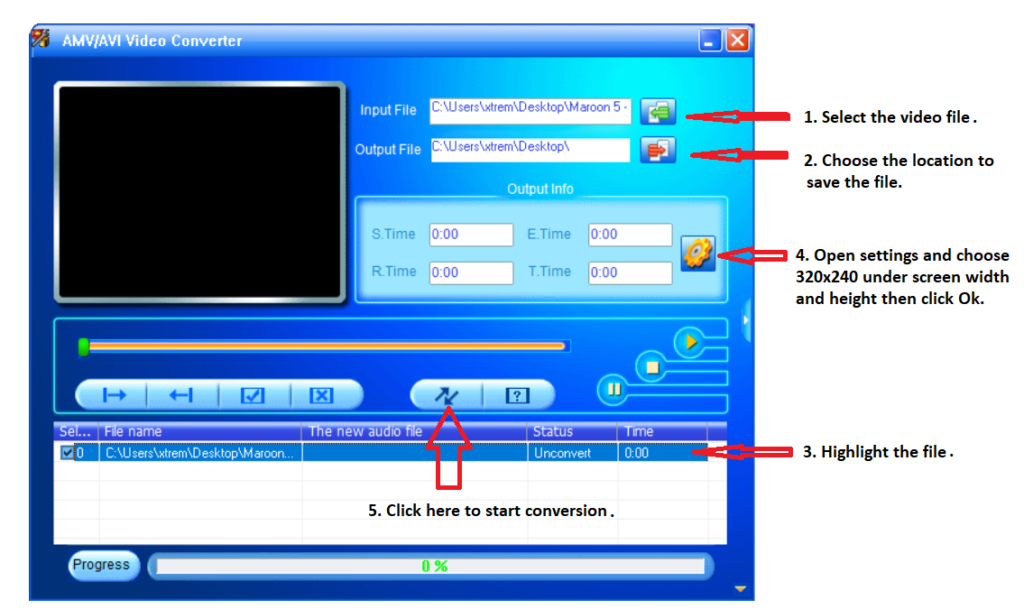
Step 4: Kindly see below the steps listed in numbered order and follow the instructions.
Step 5: Copy the converted video file to the player.